Need help with Vuukle?🤔
This is the place you are looking for!
If you are using WordPress for your website there are several options you can enable/disable or modify using Vuukle WordPress plugin. To access Vuukle Settings in WordPress click on Settings in menu on the left, and then choose Vuukle from submenu.
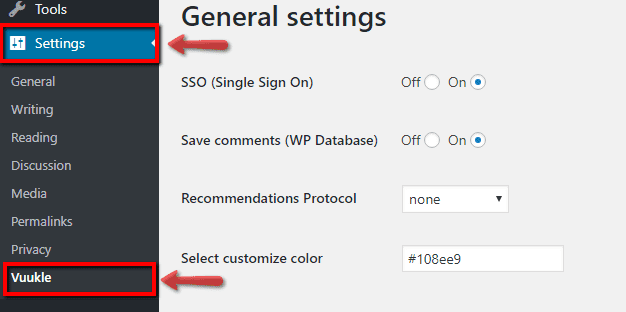
Vuukle WordPress plugin – options description
General settings
SSO
Turn on if you want to access multiple applications with one set of login credentials.
Save comments (WP Database)
Choose if you want the comments to be saved in the WP database.
Recommendations Protocol
Choose the protocol which will be used for recommended articles.
Select customize color
You can customize the color looking’s of Vuukle widgets.
Remove Vuukle from the posts
If for some reason you want to leave a page without our widgets - you can simply type the id in this field.
Export comments
You can export the comments between desired dates.
PowerBar widget
Show Share Bar
You can turn the widget status to on/off by toggling the radio.
Share Bar Position
Choose do you want to show share bar before or after content post.
Share Bar Type
There are two types of Share Bar position that you can prefer: vertical and horizontal.
Share Bar Styles
This settings is used only with vertical type. You can customize the position of the Share Bar by yourself.
Recommendations wide images
If turned on the recommended articles will be showed with wide images.
Global recommendations
Enables global recommendations in emotes, comments and newsfeed widget.
Sharing option customization
This setting gives the possibility to choose what sharing options will be active in the PowerBar widget. If you want to activate a sharing option - you simply drag&drop it from “Not active” to “Active” box.
Emote widget
Show Emote at the end of each post
You can turn the widget status to on/off by toggling the radio.
- Emote first name: you can change the name of the first emote.
- Emote first url image: you can change the picture of the first emoji by typing your own url.
- Emote second name: you can change the name of the second emote.
- Emote second url image: you can change the picture of the second emoji by typing your own url.
- Emote third name: you can change the name of the third emote.
- Emote third url image: you can change the picture of the third emoji by typing your own url.
- Emote fourth name:you can change the name of the fourth emote.
- Emote fourth url image:you can change the picture of the fourth emoji by typing your own url.
- Emote fifth name:you can change the name of the fifth emote.
- Emote fifth url image: you can change the picture of the fifth emoji by typing your own url.
- Emote sixth name: you can change the name of the sixth emote.
- Emote sixth url image:: you can change the picture of the sixth emoji by typing your own url.
Emote size
Using this setting you can change the emotes size in pixels.
Comment widget
Disable Guest Login
Here you can enable/disable the ability of users to log in using social media.
Comment Character Limit
You can adjust the number of characters that the users will have in order to write a comment.
Language(Google Transliterate)
Transliteration is the conversion of a text from one script to another. Choose language your site uses. That way, comments using other language scripts will be shown in your preferred language script.
Default Language(“No” for English, “Yes” for non-english)
No = English
Yes = non-English
Sorting
You can choose which method of sorting will be used: “from latest - to oldest” or “from oldest - to latest”.
Dark mode
The dark mode can be used to invert colors of the widgets from black to white.
Hide recommended articles
If option “Yes” is chosen the recommended article section will not appear.
Hide comment input box
You can use this option to hide comment input box. The users can reply and like the comments, but won’t have possibility to write new ones.
Commenting closed
This option gives the possibility to completely close the commenting.
Count to load
The amount of comments that will load on the page.
Toxicity Limit
Every comment is analyze for toxicity. If the text has offensive, violent words the possibility to post this comment will be disabled. The lower the limit - the strict is the words check.
Spam Limit
Same as for toxicity, every comment is checked for spam.
Enable comments
Turn this “off” if you want to completely hide the Vuukle widgets from the website.
Vuukle WordPress plugin – options screenshot
